

MaestroX CONNECT
Vendor Compliance Visibility
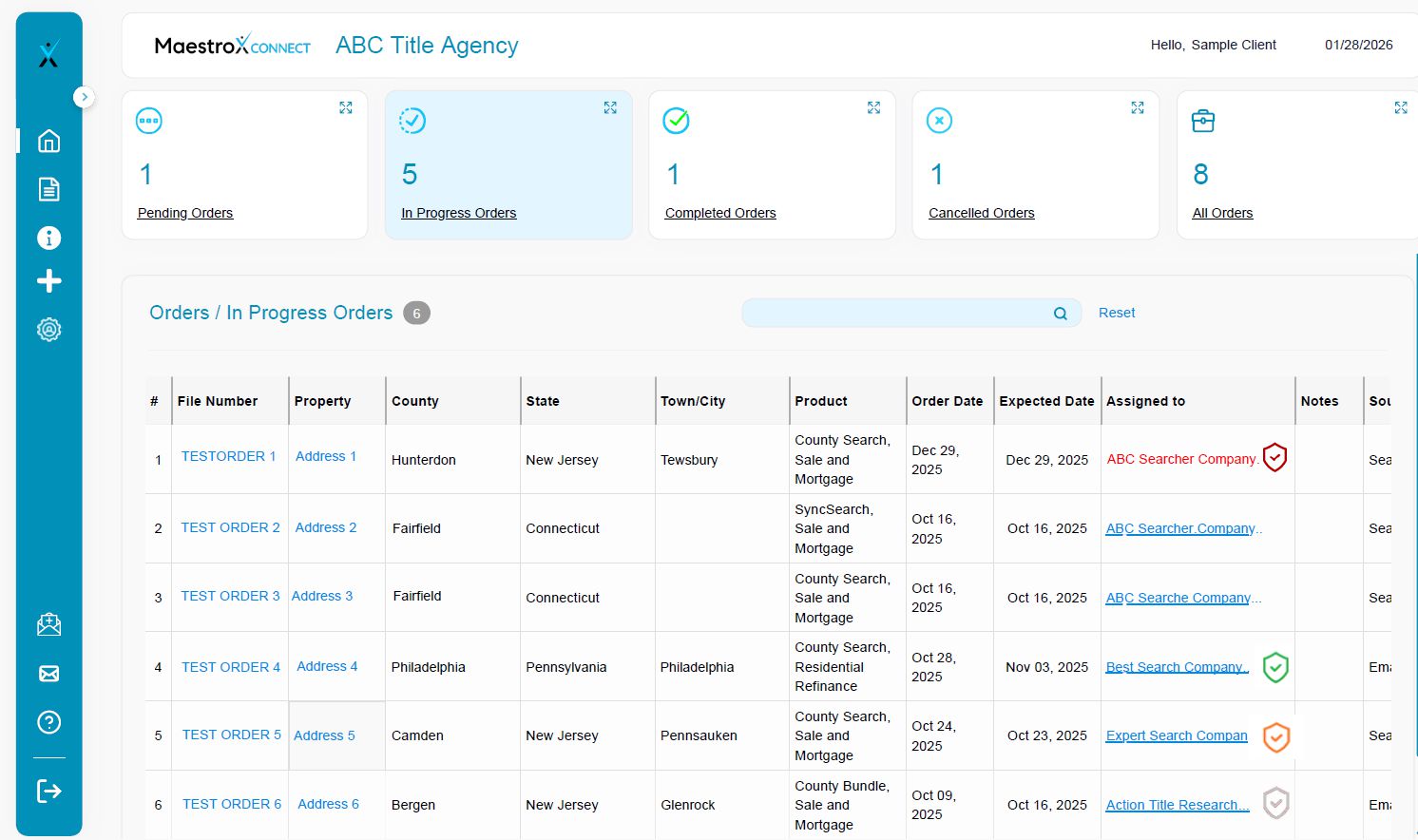
New: Search Vendor E&O Compliance Badges
Instantly see whether your assigned search vendor is compliant—directly in MaestroX CONNECT order queues. Click the vendor name to open their profile and view E&O details and uploaded documentation in FLOW.
Badge Legend
- Green — Compliant (E&O active / not expired)
- Orange — Compliant, but expires within 30 days
- Red — Not compliant (E&O expired)
- Gray — No E&O on file (not uploaded / not provided)
Example view in CONNECT (badge shown next to Assigned Vendor)
Why this matters
- Reduce risk by preventing assignments to non-compliant vendors
- Improve audit readiness with clear, documented compliance status
- Enable faster vendor management without leaving the queue
How to use it
1) Review the badge next to the vendor name in your queue.
2) Click the vendor name to open their profile and verify coverage details.
3) For Orange/Red/Gray statuses, follow your internal escalation or
If you have questions or concerns please contact Suppoort@maestrox.com
© MaestroX • Smarter automation across the full title search pipeline
